01 — Overview
What is TattooJinn?
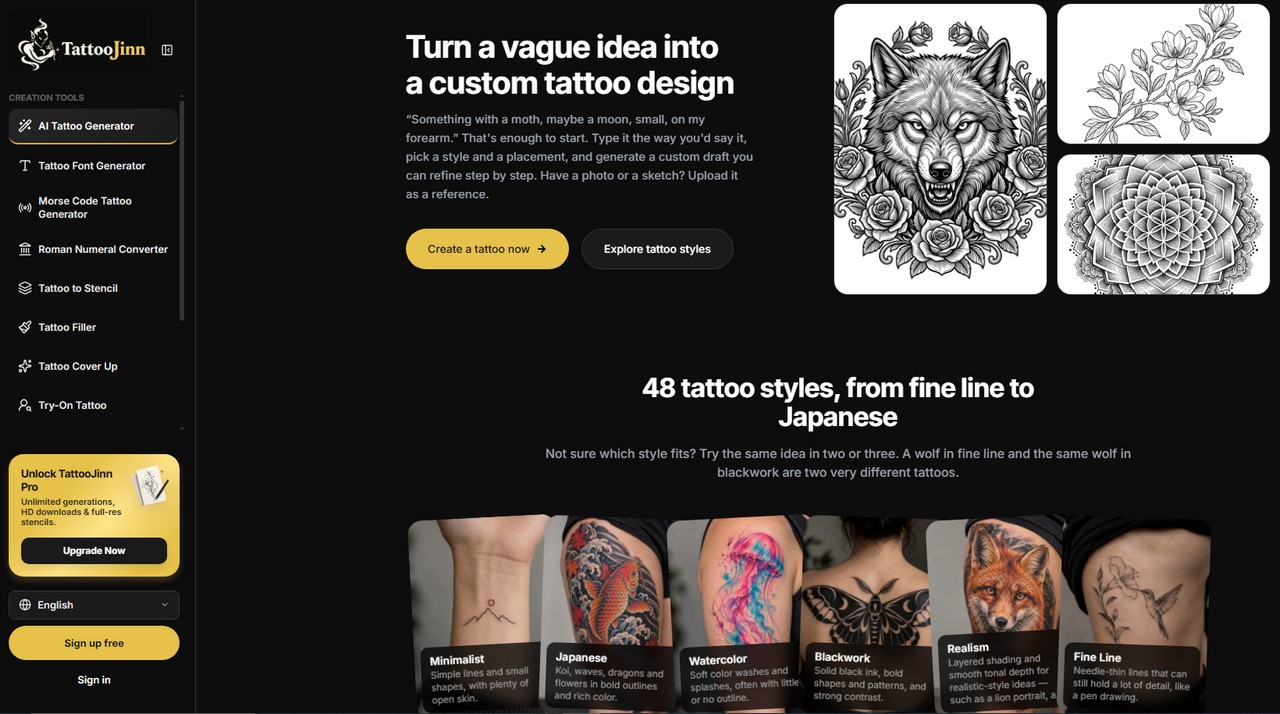
TattooJinn is a browser-based AI tattoo generator built for the earliest stage of the process: turning a vague idea into a visual starting point. You type your idea the way you would say it to a friend—"something with a moth, maybe a moon, small, on my forearm"—pick one of 48 styles, choose a body placement and size, and generate a draft sketch with no drawing skills required. You can also upload a photo or a sketch as a reference. The point isn't a finished, ready-to-ink design; it's a few directions you can bring to a consultation so your artist has something to react to rather than a long verbal description.
What makes it more useful than a generic image generator is the structure around the design. The 48 styles span Fine Line, Blackwork, Micro Realism, Dotwork, Mandala, Neo-Trad, Classic, New School, Black & Grey, Trash Polka, Geometric, Old School, Tribal, and more—and the site encourages trying the same idea in two or three styles, because a wolf in fine line and a wolf in blackwork are very different tattoos. Placement matters too: you can test the same concept on a wrist, forearm, or ankle to see where it sits best. Every generation produces a draft you can refine with text prompts or by painting over an area with a brush, and each edit is saved as a new version so you can compare them side by side.
The tool set extends beyond the core generator. A separate "tattoo to stencil" function converts a design into clean line art, a font creator sets names, dates, or short quotes in different lettering styles, and dedicated tools for tattoo filler, cover-up, and try-on let you draft ideas from a photo of your own skin. Projects are saved in "My projects"—guest projects are kept for 30 days, and an account keeps them permanently. The site is honest about its limits: it produces draft sketches meant as a starting point, and your artist will adapt the size, detail, and flow to your body.
A well-structured tattoo design tool that understands its place in the process—draft ideas for a consultation, not a replacement for an artist—with real style variety and a clear free path.
Interface & Gallery
Visual preview.
02 — Key features
What it does best.
-
01
48 Tattoo Styles
Fine Line, Blackwork, Micro Realism, Dotwork, Mandala, Neo-Trad, Trash Polka, Geometric, Old School, and more—enough to test the same idea in genuinely different directions.
-
02
Style, Placement, Size, and Color Controls
Choose body placement and general size alongside style, so the same concept can be tested on a wrist, forearm, or ankle.
-
03
Version-Based Refinement
Every edit—whether by text prompt or brush painting—creates a new saved version to compare against earlier drafts.
-
04
Connected Tattoo Tools
Stencil maker, font creator, filler, cover-up, and try-on tools all feed into the same project library.
03 — Honest take
Pros & cons.
Why we like it
- Designed for the real workflow — it produces draft directions to bring to a consultation, which is honest about what AI tattoo tools are actually useful for
- 48 styles with real variety — the range from Fine Line to Trash Polka means you can genuinely explore different aesthetics, not just variations of one look
- Version-based editing — text and brush edits create comparable versions instead of overwriting your work, which makes iteration practical
- Connected toolset — stencil maker, font creator, filler, cover-up, and try-on share the same project library, so the whole prep process stays in one place
Where it falls short
- Free tier limits results to 1 of 4 per generation — guests only see one of the four designs generated, and HD downloads require Pro
- Payments are non-refundable — the site states payments are non-refundable except where consumer-protection law requires otherwise
- Pro requires a card for the trial — the 3-day free trial needs payment details upfront, even though you aren't charged until it ends
- Drafts are a starting point, not a final design — the site is clear that your artist will need to adapt size, detail, and flow to your body
04 — Plans & pricing
What it costs.
Guest
3 tries total (generations and edits each use one try) · 1 of 4 results per generation · no HD downloads · projects kept 30 days
Free Account
50 tries total · all 4 results per generation · no HD downloads · projects kept permanently
Pro
Unlimited generations · all 4 designs every time · HD downloads · all AI tools · 3-day free trial with card required
05 — FAQ